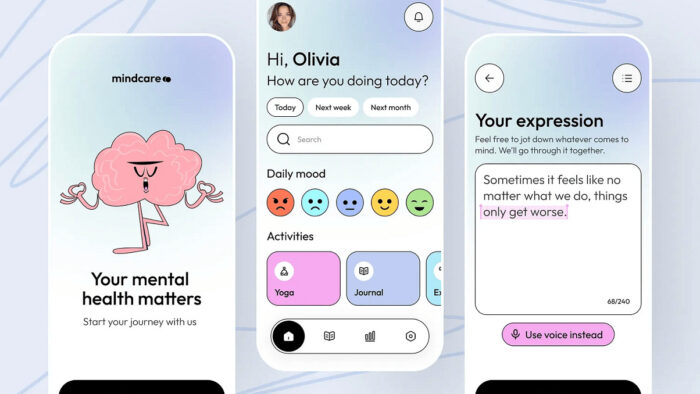
Key Takeaways: Digital Journaling Apps for Stress and Mood Tracking
- Decide whether you want a diary, a tracker or prompts.
- A single mood number is easy to chart and hard to interpret.
- Use a device passcode and app lock where available.
Table of Contents
- Decide whether you want a diary, a tracker or prompts
- Scores can flatten complicated emotions
- Privacy begins with the lock screen
- Prompts should open thought, not prescribe management
- Avoid turning reflection into another streak
- A useful two-minute structure
- When to share a journal entry
- Choose prompts that lead somewhere
- Related articles
- Write for a future conversation, not an algorithm
- A calmer conclusion
- What the research actually covers
A journal can help someone slow down, notice patterns and bring clearer examples into a conversation with a therapist or doctor. Digital journaling adds search, reminders and mood charts, but it also stores highly personal material in an account that may be analyzed, synchronised or lost.
Journaling is a reflection tool, not an emergency service or a diagnosis. Seek appropriate professional support for severe distress, self-harm thoughts, trauma reactions or symptoms that interfere with daily life.
Decide whether you want a diary, a tracker or prompts
A free-writing diary supports narrative. A mood tracker captures repeated ratings. Prompt-based apps guide short reflections. Combining all three can be useful, but it can also make the routine feel like a survey.
Choose the smallest format that fits the purpose. A person preparing for therapy may need dates, triggers and examples, while someone building a gratitude habit may want only a brief evening note.
Scores can flatten complicated emotions
A single mood number is easy to chart and hard to interpret. The same rating can describe tiredness, grief, conflict, illness or a difficult day. Add a short note when context matters and avoid treating the graph as a verdict.
Automatic sentiment analysis may misunderstand humour, culture, mixed feelings or private language. Its output should remain optional and editable.
Privacy begins with the lock screen
Use a device passcode and app lock where available. Check whether previews appear in notifications, whether entries sync to a shared family account and whether backups are encrypted.
Read the policy for analytics and model training. A private journal should not quietly become material for advertising or product development without clear consent.
- Disable notification previews.
- Review cloud backup settings.
- Use a unique password and multi-factor authentication.
- Export entries before changing services.
Prompts should open thought, not prescribe management
Helpful prompts invite observation: what happened, what did you notice and what support might help? Be cautious when a journaling app interprets symptoms, assigns a disorder or gives management instructions from a short entry.
A responsible app encourages professional support when the pattern suggests persistent difficulty and does not promise that writing alone will resolve every problem.
Avoid turning reflection into another streak
Missed days are normal. A journal can be used when there is something to record, on a weekly schedule or for a limited period around a specific issue. Daily use is not automatically better.
If writing repeatedly increases rumination, shorten the session, switch to a practical format or discuss the experience with a professional.
A useful two-minute structure
Record the situation in one sentence, name the strongest feeling, note the body response and write one next step. This creates enough context without requiring a long entry.
At the end of the week, look for repeated situations rather than judging each day. Save only the patterns that are useful for future action.
- Situation
- Feeling
- Body signal
- Next helpful step
When to share a journal entry
A journal can help a therapist or clinician understand a pattern, but sharing the entire archive is rarely necessary. Choose a few entries that show the issue clearly and remove unrelated details about other people.
Ask whether the provider wants a summary, dates or exact wording. Keeping control of the record can make the conversation feel safer and more focused.
- Share only what supports the discussion.
- Protect information about third parties.
- Keep the original entry private when a summary is enough.
- Use secure channels requested by the provider.
Choose prompts that lead somewhere
Prompts are useful when they help identify a need, decision or pattern. Endless questions about feelings can become repetitive. Mix reflection with practical prompts such as what support is available, what boundary is needed or what can be postponed.
An entry does not need to end positively. Honest description is more useful than forced optimism.
Related articles
- How to Evaluate a Mental Health App Before You Trust It
- Meditation Apps and Evidence: What to Look For
Write for a future conversation, not an algorithm
A useful journal records events, feelings, sleep, medication changes or coping strategies in language the person understands. Automatic sentiment scores may miss sarcasm, culture and mixed emotions, so they should not replace the writer’s own interpretation.
Keep entries private by default and review export, backup and deletion settings. If journaling repeatedly intensifies rumination or distress, change the prompt, shorten the session or seek support.
A calmer conclusion
Digital journaling should create space for reflection, not another obligation. Keep the purpose narrow, protect the entries and step away from features that interpret more than the evidence allows.
Some people prefer local-only storage or a document kept on the device rather than a cloud account. That option reduces synchronisation convenience but may offer greater control. Check how backups work before assuming that deleting the app also deletes the entries.
What journaling research actually covers
Expressive writing has a research literature behind it, and digital journaling apps borrow its credibility without usually being the thing that was studied. The NIMH’s material on stress and the NCCIH’s review of relaxation techniques are the reasonable references for what practices of this kind can and cannot do, and both are more measured than app marketing.
The specific gap is product evidence. The NIMH notes there is very little regulation of mental health apps, very little information on effectiveness, no accepted rules for evaluating one, and that most carry no peer-reviewed research supporting their claims. Mood tracking in particular is often presented as if the graph were a clinical instrument. It is a record of what you reported, useful for spotting patterns you would otherwise forget, and not a measurement of anything.
The part worth being most careful about is data, because a journal is the most sensitive text most people will ever type into an app. A wellness app is generally not a covered entity under HIPAA, and the FTC has taken action over health privacy claims in this market. Before you commit, check whether entries are encrypted, whether they are stored on the device or on a server, whether the company can read them, and whether anything is used for advertising or model training. If the answer is not clearly stated, treat that as the answer.